
Interstitial ads place a large creative over a webpage or app interface before users continue to the content. For affiliate campaigns, the first distinction is where the ad appears: a website or a Telegram Mini App.
| # | Network | Interstitial placements | Pricing models | GEOs | Best for verticals | Minimum deposit | Special features | More |
|---|---|---|---|---|---|---|---|---|
| 1 |
 Adsterra
|
Website overlays Social Bar subformat |
CPM CPA |
248 |
iGaming eSports VPN Utilities, Mobile Apps Dating Ecommerce Subscriptions Browser Extensions |
$100 |
Customizable image, text, and CTA templates up to 15 creatives per campaign |
|
| 2 |
 RichAds
|
Telegram Mini Apps static and video interstitials |
CPM |
220 |
Gambling Betting Nutra Utilities Antivirus |
$150 |
Premium subscriber targeting motivated/non-motivated audience filters |
|
| 3 |
 Clickaine
|
Web interstitials |
CPM |
195 |
Betting Gambling Nutra Dating Ecommerce Software Crypto Adult offers |
$20 |
Optional Smart Bidding |
How Do Interstitial Ads Work?
Users can click an interstitial to visit your landing page or close it to continue using the website or app. The close button may appear immediately or after a delay. Size also varies: some placements fill the screen, while others use a large overlay. For example, Adsterra’s interstitial templates occupy 45–80% of the screen.
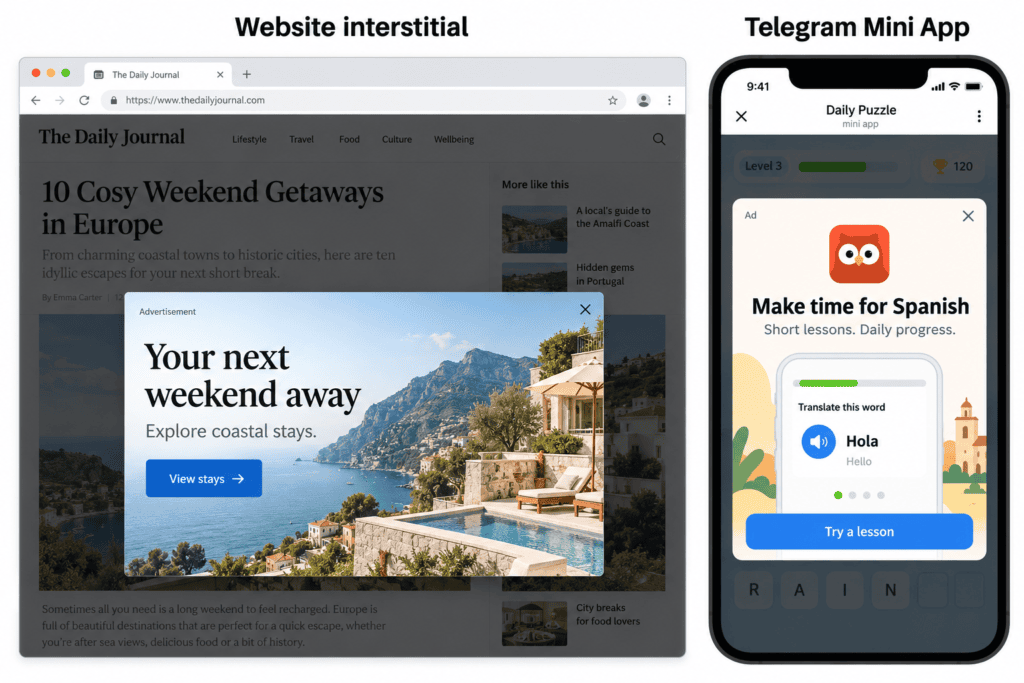
Web interstitials appear over website content. In-app placements appear inside applications, often at breaks such as the end of a game level.
| Format | Where it appears | How users reach your landing page |
|---|---|---|
| Interstitial | Overlays the current webpage or app interface | By clicking the ad |
| Popunder | Opens a separate browser tab or window behind the active one | Your landing page loads directly in that tab or window |
| In-page push | Displays a notification-style unit within a webpage | By clicking the unit |
With an interstitial, the creative comes before the landing-page visit.
Which Interstitial Ad Network Should You Choose?
Adsterra: Website Overlays with CPM or CPA Buying
Adsterra serves interstitials on websites as a Social Bar subformat. Its advertiser FAQ lists CPM and CPA for interstitial traffic. The CPA setup guide explains that CPA campaigns begin with a paid CPM test, so budget for that stage rather than assuming every charge will be tied to a conversion.
Its templates combine images, text, and CTA buttons, with up to 15 creatives per campaign.
RichAds: Static and Video Ads in Telegram Mini Apps
RichAds offers static and video interstitials inside Telegram Mini Apps. Its Telegram advertising FAQ lists CPM buying for both and a $150 minimum deposit. Targeting includes Telegram Premium subscribers and motivated versus non-motivated audiences. Confirm that your affiliate offer accepts the audience type you select.
Its simulation-game case study reports $0.097 per acquired user and $0.357 per active, returning user for static interstitials across Ukraine, Kazakhstan, and Uzbekistan. These are results from that campaign, not expected costs for another offer.
Clickaine: CPM Interstitials with Optional Smart Bidding
Clickaine describes web interstitials in its ad format guide. Its format-specific pricing table lists CPM, without CPC, and supports optional Smart Bidding. This tool adjusts bids across placements; Clickaine notes that enabling it may reduce traffic volume.
Before funding a test, confirm that interstitial inventory is currently available for your target GEO and device: the format appears in its guides but is absent from the main format list on its advertiser page.
Choosing Affiliate Offers for Interstitial Traffic
Direct Linking or a Prelander?
Adsterra’s BingoPlus campaign used direct linking to promote an Android app.
For gambling offers, test a direct link to the advertised bonus page against a prelander explaining the bonus and its conditions. Adsterra’s BABU88 campaign provides an example of an interstitial funnel using a prelander. Compare the variants by cost per qualified first-time depositor (FTD), applying your offer’s deposit and player eligibility requirements. For dating offers, match the creative to the actual service and the next step on the landing page, whether that is registration, chat, or a paid subscription. If the offer pays for subscriptions, use free registrations to diagnose the funnel and choose the winning variant by cost per approved subscription.
Gambling, Dating, and Adult: Traffic Fit and Restrictions
Confirm that the network accepts your offer, GEO, and creative for interstitial traffic. Submit the ad, prelander, and final landing page together: Clickaine’s guide to restricted verticals explains that moderation can cover the entire funnel. Approval of a mainstream dating offer does not establish permission to run explicit adult promotions.
Where category targeting is available, test mainstream and adult placements in separate campaigns. Compare approved conversions by publisher or zone ID within each group. Keep rewarded traffic in a separate campaign and use it only when the affiliate offer explicitly accepts incentivized users.
Testing and Optimizing Interstitial Campaigns
Preview the ad and follow the full path to the offer on your target devices. For RichAds’ Mini App placements, open the destination from inside Telegram. Send a test conversion through the tracking setup to catch missing events before buying traffic.
Track spend and approved commission by placement and creative ID. Cheap registrations can hide an expensive final conversion, so allow for reporting and approval delays before excluding sources. For RevShare, compare acquisition costs with commission accumulated over the same number of days after acquisition.
To compare direct linking with a prelander, split traffic between the two paths and assign separate tracking IDs. Keep placements, GEOs, devices, creatives, bids, and frequency caps consistent, and set a spending limit for each variant. Judge the result by approved commission relative to spend. The share of prelander visitors who reach the offer helps locate drop-offs, but a higher click-through rate alone does not establish profitability.
FAQ
First, verify that your tracker receives conversion events correctly and allow for the offer’s usual conversion delay. Compare network clicks, landing-page visits, registrations, and paid actions. For missing visits, check redirects and page loading. For visits without registrations, check the registration flow and offer presentation. For registrations without payments, check payment availability, pricing, and deposit requirements.
One creative can serve several offers if every destination delivers its promise. An ad featuring a specific casino bonus requires that bonus on each destination. Split comparable traffic between offers, keeping GEOs, devices, placements, and timing consistent. Use separate tracking IDs and compare approved earnings relative to spend.
Interstitial describes the placement; rewarded describes the incentive. Some placements give users an in-app benefit for viewing an ad, while others offer no reward. A viewing reward also differs from an incentive to register or deposit. Confirm that the affiliate offer accepts the specific reward mechanism before buying that traffic.
A finished banner may work if the network accepts its dimensions and file format. Other interstitial templates require separate assets: an image, headline, description, and CTA. Check the specifications rather than simply resizing the banner, then preview the adapted creative on your target devices.
Reaching an affiliate offer’s cap does not automatically stop your ad campaign unless you have configured an integration to do so. Further conversions may go unpaid, depending on the offer’s terms. Pause acquisition or route new clicks to an approved alternative that matches the creative. Users already sent to the original offer remain there; confirm how their pending conversions count toward the cap and whether they will be paid.

Ratmir started his copywriting career back in 2016. He is now editor-in-chief with an MA with Honors in Linguistics.
His primary expertise is in affiliate marketing, EdTech, education, IT, and sports.
Ratmir specializes in content marketing, content management, proofreading, and translation.